WordPress powers a huge share of the web, and most of those sites still run Google Analytics out of habit. If you’d rather respect your visitors — and lose the cookie banner headache — there’s good news. Adding privacy-friendly analytics to WordPress is one of the easiest privacy upgrades you can make. Often it’s a single script tag.
I’ve moved dozens of WordPress sites off GA4 onto lightweight, cookieless tools. Below are the four methods I actually use, ranked from simplest to most controlled, plus the mistakes that trip people up.
Why Switch WordPress Off Google Analytics?
Three reasons come up again and again with clients:
- Speed. GA4 plus a tag manager loads several kilobytes of script. A privacy-first tracker is usually 1–3 KB and loads once.
- Consent simplicity. Cookieless tools often remove the need for a consent banner, which means fewer dismissed-banner bounces and a cleaner first impression.
- Trust. Telling visitors “we don’t track you across the web” is a real competitive signal, not just a compliance checkbox.
The trade-off is honest: you lose GA4’s deep behavioral reports. For most content sites and small businesses, that depth was never being used anyway.
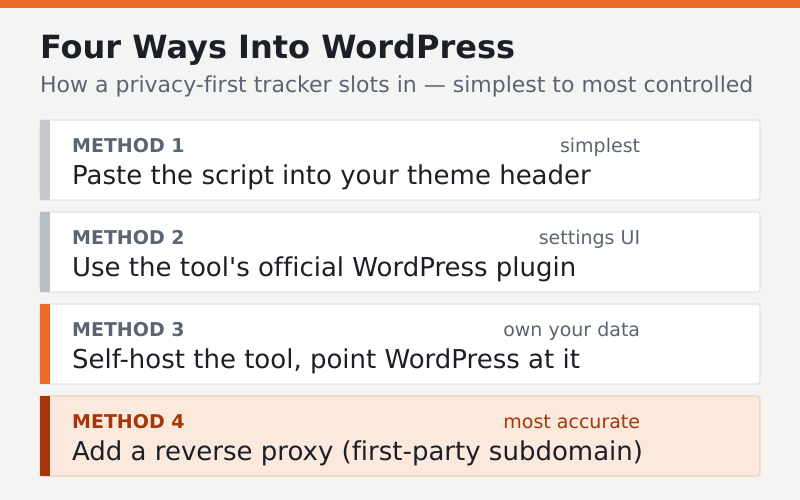
Method 1 — Paste the Script Into Your Theme (Simplest)
Every privacy-first tool — Plausible, Fathom, Simple Analytics, Umami — gives you a single small <script> tag. The most direct way to add it is in your theme’s header. If your theme has a built-in “header scripts” or “custom code” box, paste it there.
If it doesn’t, use a tiny code-insertion plugin (there are several well-maintained free ones) so you don’t lose the snippet when your theme updates. Avoid editing header.php directly in a parent theme — an update will overwrite it.
Tip: Place the tracking script in the
<head>so it loads early enough to catch the pageview, but because these scripts are tiny and load asynchronously, they won’t slow down your page meaningfully.
Method 2 — Use the Tool’s Official WordPress Plugin
Some privacy-first tools publish an official WordPress plugin. Plausible, for example, offers one that adds the script and unlocks an optional proxy mode, which serves the tracker from your own domain to slip past ad blockers. Plugin availability and features change, so check the tool’s current offering.
Plugins are the right pick if you want a settings screen rather than raw code, or if you want that proxy feature without configuring nginx yourself. The downside is one more plugin to keep updated — a fair trade for the convenience.
Method 3 — Self-Host and Point WordPress at It
If you want to own your data outright, self-host the analytics tool on your own server and then add its tracking snippet to WordPress using Method 1 or 2. The WordPress side is identical; only the tool’s home address changes. Matomo and Umami both work this way.
This gives you full data ownership at the cost of running a small server. If that appeals, our walkthrough on standing up a self-hosted tool with Docker pairs well with this step, and our server-side tracking guide covers the proxy configuration.
Method 4 — Add a Reverse Proxy for Maximum Accuracy
Whichever tool you choose, the single biggest accuracy improvement is serving the tracking script from your own domain instead of the tool’s. Ad blockers maintain lists of known analytics domains; a first-party subdomain like stats.yoursite.com isn’t on those lists.
On WordPress hosted behind nginx or Cloudflare, this is a short config change. The payoff is real: I’ve seen reported traffic jump 20–40% on a site simply because the proxy stopped blockers from eating the data. Exact recovery varies by audience and ad-blocker usage.
What to Track on a WordPress Site
Privacy-first doesn’t mean blind. With a cookieless tool you can still capture the essentials:
- Pageviews, top content, and referrers — your bread and butter
- Outbound clicks and downloads as custom events
- Form submissions and signups as goals
- 404 errors so you can fix broken paths
That’s plenty to make editorial and marketing decisions. You don’t need a user-level profile to know which post is winning.
Common Mistakes to Avoid
- Running GA4 and the new tool at once forever. Run them in parallel for a couple of weeks to compare, then remove GA4 to reclaim the speed.
- Editing theme files directly. Use a child theme or a code-snippet plugin so updates don’t wipe your script.
- Keeping the consent banner out of habit. If your new tool is genuinely cookieless and your site has no other trackers, you may not need it — but confirm with legal counsel for your jurisdiction first.
- Forgetting the proxy. Without it, ad blockers quietly undercount your traffic.
FAQ
Which privacy-friendly analytics tool is easiest on WordPress?
Plausible and Fathom are the gentlest entry points because both are a single script tag and Plausible offers an official plugin with proxy support. If you want zero subscription cost and don’t mind running a server, self-hosted Umami is the next step up.
Will privacy-first analytics slow down my WordPress site?
No — the opposite. These scripts are typically 1–3 KB and load asynchronously, versus the heavier GA4-plus-tag-manager stack. Removing the old setup usually improves Core Web Vitals, especially on mobile where script weight hurts most.
Do I still need a cookie consent banner after switching?
Often not, if your new tool is truly cookieless and you’ve removed other trackers. Consent rules depend on your jurisdiction and what else runs on your site, so verify your specific obligations with a legal advisor before removing an existing banner.
Can I keep my old Google Analytics data?
Yes. Export your historical GA4 data before you remove it so you keep a record. Your new privacy-first tool starts fresh, so running both briefly in parallel helps you bridge the gap and compare numbers during the transition.
Adding privacy-friendly analytics to WordPress is rarely the hard part — the hard part is deciding to do it. Pick a tool, drop in the script, add a proxy for accuracy, and pull GA4 once you trust the new numbers. Your visitors get their privacy back, and your pages get faster. For the bigger picture, see our complete cookieless analytics guide.