Pageviews tell you how many people showed up. Goals tell you how many people did something that matters — signed up, downloaded a guide, clicked through to a partner, finished checkout. If you’ve set up a privacy-first tool but you’re only looking at traffic charts, you’re leaving the most useful data on the table.
Plausible makes goal tracking refreshingly simple, and unlike GA4 you can do it without cookies or a sprawling configuration screen. Here’s how to set up goal tracking in Plausible Analytics, using the two goal types I configure for almost every client.
The Two Kinds of Goals in Plausible
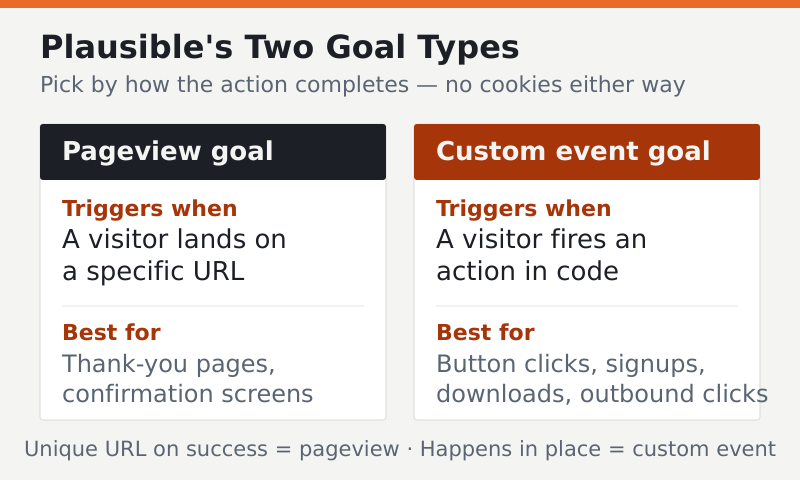
Plausible supports two goal types, and knowing which to use is half the battle:
| Goal type | Triggers when | Best for |
|---|---|---|
| Pageview goal | A visitor lands on a specific URL | Thank-you pages, confirmation screens |
| Custom event goal | A visitor performs an action you fire in code | Button clicks, signups, downloads, outbound clicks |
The rule of thumb I give clients: if completing the action sends the user to a unique URL, use a pageview goal. If it happens in place — a button or form that doesn’t change the page — use a custom event.
Prerequisites
- Plausible already installed on your site (if not, follow our Plausible setup guide first)
- Access to your Plausible dashboard
- The ability to edit your site’s HTML for custom events
Method 1 — Pageview Goals (No Code)
This is the easiest win and requires zero development. Say your contact form redirects to /thank-you/ after submission. That URL is your success signal.
- In your Plausible dashboard, open Site Settings → Goals.
- Click Add goal and choose Pageview.
- Enter the path, for example
/thank-you/. - Save.
From now on, every visit to that page counts as a goal conversion, and Plausible shows you the conversion rate and which sources drove it. No code, no cookies, done in a minute.
Tip: Pageview goals support a wildcard, so
/blog/**would count any blog visit, and/download/*would catch any single-level download page. Use this to group related success pages into one goal.
Method 2 — Custom Event Goals (A Little Code)
For actions that don’t load a new page — a “Start free trial” button, a newsletter signup, an outbound click — you fire a named event in JavaScript. Plausible exposes a global function for exactly this.
First, make sure your tracking snippet uses the script variant that supports custom events (Plausible documents which file to load — this changes occasionally, so check their current docs). Then call the event when the action happens:
<button onclick="plausible('Signup')">Start free trial</button>Or, more cleanly, attach it in your own script:
document.querySelector('#trial-btn')
  .addEventListener('click', function () {
    plausible('Signup');
  });
The string you pass — 'Signup' here — is the event name. Pick clear, consistent names; you’ll thank yourself later when the goals list stays readable.
Step 3 — Register the Event as a Goal
Firing the event isn’t enough on its own — you also tell Plausible to treat that event name as a goal:
- Go to Site Settings → Goals → Add goal.
- Choose Custom event.
- Enter the exact event name you used in code, for example
Signup(it’s case-sensitive). - Save.
Now Plausible counts every fired Signup event and reports its conversion rate alongside your pageview goals.
Step 4 — Read Your Conversions
Back on the main dashboard, your goals appear in a Goal Conversions panel. For each goal you see the number of conversions and the conversion rate. Click a goal to filter the entire dashboard by it — now you can see which sources, pages, and countries drive that specific action.
This is where privacy-first analytics stops being a scoreboard and starts driving decisions. When I set goals up for a SaaS client, we discovered their highest-converting traffic came from a single guest post — invisible in raw pageviews, obvious once goals were filtered.
Common Mistakes to Avoid
- Name mismatch. The goal name in Plausible must match the event name in your code exactly, including capitalization.
- Wrong script variant. Custom events need the extensions-enabled script. If events aren’t recording, this is usually why.
- Tracking too many goals. Pick the handful of actions that represent real value. A goals list with thirty entries is noise, not insight.
- Forgetting to test. Trigger the action yourself and confirm the conversion appears before assuming it works.
FAQ
Does Plausible goal tracking use cookies?
No. Goal tracking in Plausible works the same cookieless way as its pageview counting. It doesn’t set identifiers or build user profiles, so adding goals doesn’t change your consent obligations compared with the base install.
How many goals can I track in Plausible?
Plausible doesn’t impose a tight limit, but more isn’t better. Track the few actions that represent genuine business value — signups, purchases, key downloads — so your conversion data stays meaningful rather than cluttered with low-signal events.
Can I assign a revenue value to a goal?
Plausible supports revenue tracking on custom events for ecommerce-style measurement, letting you attach a monetary value when you fire the event. Check Plausible’s current documentation for the exact syntax, as the feature has evolved over time.
Why isn’t my custom event showing up?
The two usual culprits are a script variant that doesn’t support events, and a name mismatch between your code and the goal definition. Confirm you’ve loaded the extensions-enabled script and that the event name matches exactly, then trigger it yourself to test.
Goal tracking turns Plausible from a traffic counter into a decision tool — and it does it without a single cookie. Start with a pageview goal on your thank-you page today, add a custom event for your most important button this week, and you’ll finally see not just who visits, but who converts. For where this fits in the bigger picture, see our guide to privacy-focused ecommerce analytics.