
The era of third-party cookies is ending. With browsers blocking tracking cookies by default and regulations tightening globally, businesses need a new approach to understanding their website visitors.
I’ve spent the past three years helping companies transition to cookieless analytics—and the results have been surprising. Many clients actually get better data after making the switch, not worse.
This guide explains everything you need to know about cookieless website analytics: what it is, how it works, why it matters, and how to implement it for your business.
What is Cookieless Analytics?
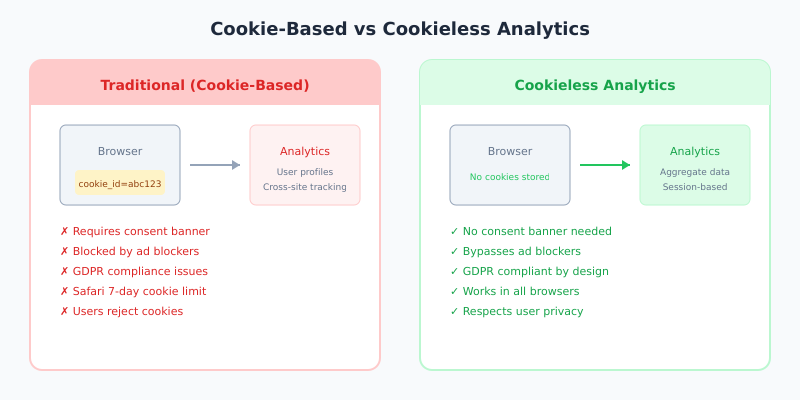
Cookieless analytics is the practice of tracking website visitors and their behavior without storing cookies on their devices. Instead of placing small files in users’ browsers to identify them, cookieless solutions use alternative methods like server-side processing, hashed identifiers, and aggregated data.
Traditional analytics tools like Google Analytics have historically relied on cookies to:
- Identify returning visitors
- Track user sessions across pages
- Attribute conversions to marketing campaigns
- Build audience segments for advertising
Cookieless analytics achieves similar goals through different technical approaches that respect user privacy and comply with regulations like GDPR and CCPA.
Why Cookieless Analytics Matters Now
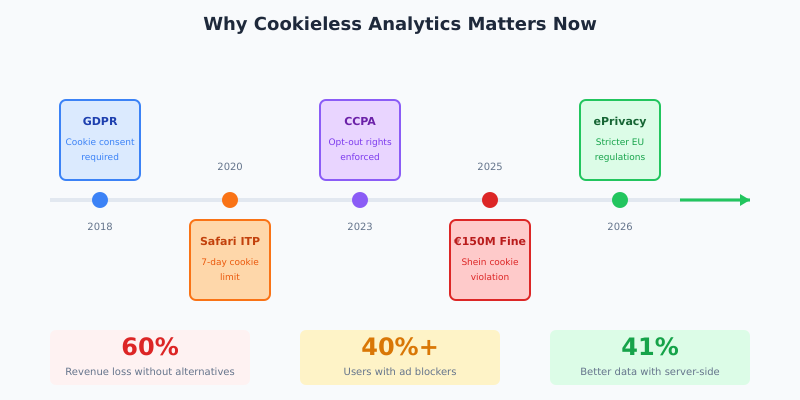
Three converging forces are making cookieless analytics essential:
1. Browser Restrictions
Safari and Firefox have blocked third-party cookies for years. Chrome, which holds 65% of browser market share, has been phasing out cookie support. Even first-party cookies now have limited lifespans in many browsers—Safari restricts them to 7 days by default.
2. Privacy Regulations
GDPR in Europe, CCPA in California, and similar laws worldwide require explicit consent before placing tracking cookies. In 2025, France fined Shein €150 million for improper cookie use. The message is clear: cookie consent isn’t optional.
3. User Behavior
Consent banners annoy users, and many simply reject all cookies. Ad blockers, which over 40% of users have installed, routinely block analytics scripts. The result? Traditional cookie-based analytics increasingly shows incomplete data.
Publishers estimate up to 60% revenue declines without effective cookie alternatives. But for most businesses, this shift is actually an opportunity to adopt cleaner, more ethical tracking.
How Cookieless Tracking Works
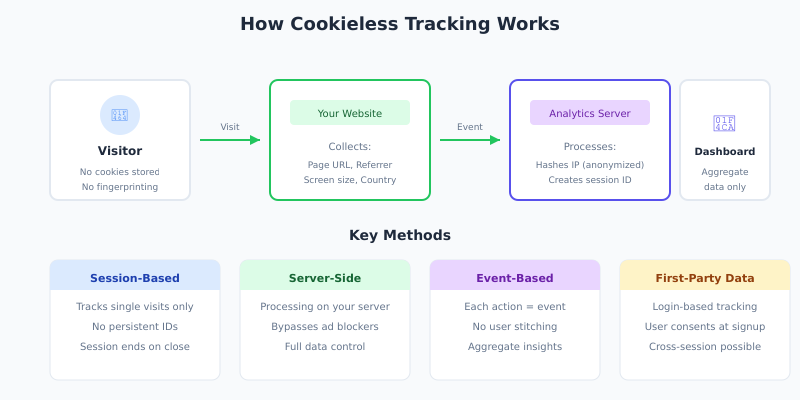
Cookieless analytics uses several techniques to track visitors without storing persistent identifiers. Here’s how the main methods work:
Session-Based Tracking
Instead of tracking users across visits, session-based tracking focuses on single visits. When someone arrives at your site, the analytics tool creates a temporary session identifier that exists only in memory—no cookies written. When the browser tab closes, the session ends.
This approach can’t tell you if someone visited yesterday, but it accurately tracks what they do during their current visit: pages viewed, time on site, conversions completed.
Fingerprint-Free Identification
Some cookieless tools use a combination of non-personal data points to recognize sessions:
- IP address (often partially anonymized)
- User agent string (browser type and version)
- Screen resolution
- Timezone and language settings
These signals are hashed together to create a temporary identifier that can’t be traced back to an individual. Unlike browser fingerprinting (which is invasive and often illegal), this approach uses only non-identifying data in aggregate.
Server-Side Tracking
Server-side tracking moves data collection from the browser to your server. Instead of JavaScript sending data directly to analytics platforms, your server acts as an intermediary:
- User visits your page
- Your server logs the request
- Server sends sanitized data to analytics
This approach bypasses ad blockers entirely (they can’t block server-side requests), gives you full control over what data is shared, and works even when JavaScript is disabled.
Event-Based Data Models
Modern cookieless tools use event-based tracking rather than session-based models. Every interaction—page view, click, scroll, form submission—is logged as an independent event with relevant metadata.
This model doesn’t require cookies because it doesn’t need to stitch events together into user journeys. You get aggregate insights (“1,000 people clicked the signup button”) rather than individual tracking (“User #12345 clicked signup”).
Cookieless Analytics Methods Compared
| Method | Privacy Level | Data Accuracy | Setup Complexity | Best For |
|---|---|---|---|---|
| Privacy-first tools (Plausible, Fathom) | Excellent | Good | Easy | Most websites |
| Server-side tracking | Good | Excellent | Complex | E-commerce, enterprise |
| First-party data | Good | Excellent | Medium | SaaS, membership sites |
| Consent Mode + modeling | Medium | Modeled | Medium | Ad-heavy sites |
Best Cookieless Analytics Tools
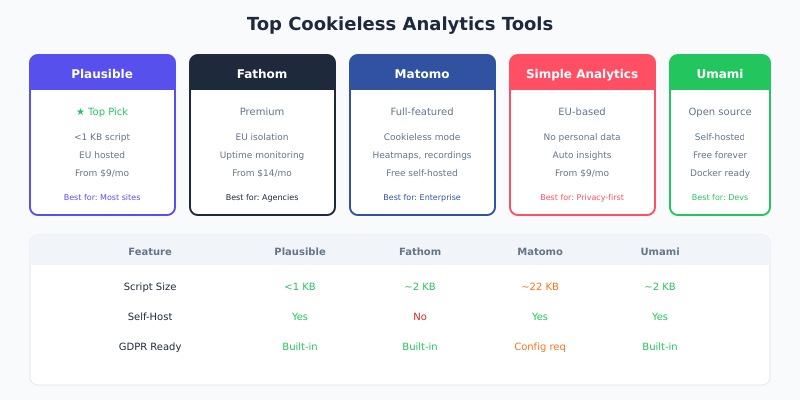
Based on my implementations, here are the top cookieless analytics options:
Plausible Analytics
My top recommendation for most sites. Plausible is cookieless by design—it literally cannot use cookies. The script is under 1 KB, GDPR-compliant out of the box, and provides all essential metrics: visitors, pageviews, sources, and goals.
Best for: Blogs, marketing sites, SaaS products, anyone who wants simple and ethical tracking.
Fathom Analytics
Similar to Plausible but with a few extras like uptime monitoring and EU data isolation. Fathom has invested heavily in legal compliance across multiple jurisdictions.
Best for: Agencies, businesses that need shared dashboards, premium experience.
Matomo (Cookieless Mode)
Matomo can run without cookies when properly configured. You lose some features (returning visitor identification) but gain full compliance. Good option if you need Matomo’s advanced features.
Best for: Enterprises migrating from GA4, sites needing heatmaps and session recordings.
Simple Analytics
EU-based, completely cookieless, with automated insights. Simple Analytics goes further than most by not storing any personal data—not even anonymized IPs.
Best for: Privacy-focused businesses, EU companies wanting EU-hosted data.
Umami
Open-source and self-hostable, Umami is cookieless by default. Great for developers who want full control and zero recurring costs.
Best for: Developers, startups, anyone comfortable with self-hosting.
Implementing Cookieless Analytics: Step by Step
Here’s how I typically help clients transition to cookieless analytics:
Step 1: Audit Current Tracking
Before making changes, document what you’re currently tracking:
- What metrics do you actually use for decisions?
- Which reports do stakeholders rely on?
- What integrations depend on your current analytics?
Most clients discover they use about 20% of available GA4 features. Focus on preserving what matters, not replicating everything.
Step 2: Choose Your Approach
Based on your needs, select one of these paths:
Path A: Full replacement — Switch entirely to a cookieless tool like Plausible. Simplest option, works for most sites.
Path B: Cookieless configuration — Configure Matomo or similar to run without cookies. Good if you need advanced features.
Path C: Server-side tracking — Implement server-side GTM with first-party data. Most complex but offers maximum control.
Step 3: Run Parallel Tracking
Install your new cookieless solution alongside existing analytics for 2-4 weeks. Compare the data:
- Are visitor counts similar? (Cookieless often shows more due to bypassing ad blockers)
- Do traffic sources match?
- Are conversions tracking correctly?
Step 4: Migrate Stakeholders
Update dashboards and reports. Train team members on the new tool. Most cookieless solutions are simpler than GA4, so training takes hours, not days.
Step 5: Remove Old Tracking
Once verified, remove Google Analytics or other cookie-based scripts. Don’t run both indefinitely—it wastes bandwidth and complicates compliance.
What You Can (and Can’t) Track Without Cookies
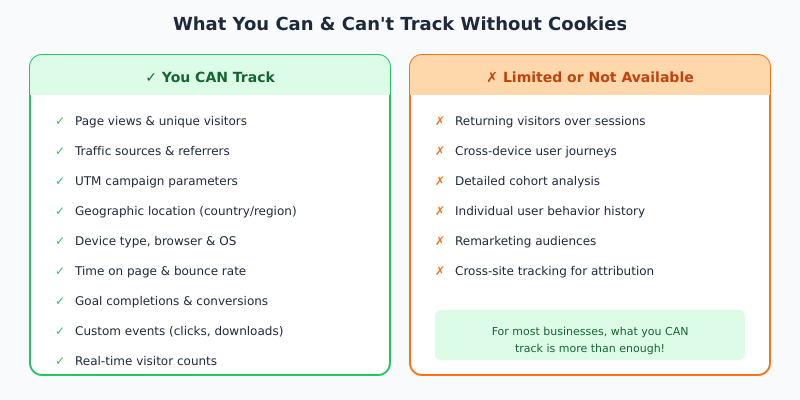
You CAN Track:
- Page views and unique visitors (per session)
- Traffic sources and referrers
- UTM campaign parameters
- Geographic location (country/region level)
- Device type, browser, and OS
- Time on page and bounce rate
- Goal completions and conversions
- Custom events (clicks, downloads, form submissions)
- Real-time visitor counts
You CAN’T Track (or it’s limited):
- Returning visitors over multiple sessions
- Cross-device user journeys
- Detailed cohort analysis
- Individual user behavior history
- Remarketing audiences
- Cross-site tracking for attribution
For most businesses, what you can track is more than enough. The metrics that drive decisions—traffic trends, conversion rates, campaign performance—all work without cookies.
Cookieless Analytics Best Practices
After dozens of implementations, here’s what works:
1. Focus on Aggregate Insights
Stop thinking about individual users and start thinking about cohorts and trends. “500 visitors from Twitter this week” is more actionable than “User #12345 visited three times.”
2. Use First-Party Data Where Possible
If users log into your site, you can track them across sessions using your own authentication—no third-party cookies needed. This is completely compliant when users understand and consent to account tracking.
3. Leverage UTM Parameters
Proper UTM tagging becomes essential without cookies. Every marketing link should include source, medium, and campaign parameters. This gives you campaign attribution without cross-site tracking.
4. Set Up Goal Tracking Immediately
Goals don’t track retroactively. Configure conversion tracking on day one so you have baseline data for future optimization.
5. Keep Stakeholders Informed
Explain that numbers might look different (often higher due to bypassing ad blockers). Focus conversations on trends rather than absolute numbers during transition.
Frequently Asked Questions
Is cookieless tracking less accurate than cookie-based tracking?
Not necessarily. Cookie-based tracking faces significant challenges: ad blockers, consent rejection, cookie expiration, and cross-device gaps. Cookieless tools often capture more visitors because their lightweight scripts bypass blockers. The data is different, not worse.
Do I still need a cookie consent banner with cookieless analytics?
If your analytics tool doesn’t use cookies or collect personal data (like Plausible, Fathom, or Simple Analytics), no consent banner is required under GDPR. However, if you use other tools that set cookies (chat widgets, advertising pixels), you may still need consent mechanisms for those.
Can I track conversions without cookies?
Yes. Cookieless tools track conversions by monitoring specific page loads (like a “thank you” page) or custom events (like form submissions). You won’t have cross-session attribution, but you’ll know exactly how many conversions happened.
How does cookieless analytics handle returning visitors?
Most cookieless tools can’t identify returning visitors across sessions since there’s no persistent identifier. Some use privacy-preserving techniques to estimate return rates, but individual visitor histories aren’t available. For most businesses, session-level data is sufficient.
Will cookieless analytics work with my marketing tools?
Most cookieless solutions integrate with common tools via APIs. You can export data to spreadsheets, connect to dashboards like Looker Studio, and set up automated reports. What you lose is direct integration with advertising platforms for remarketing.
The Future is Cookieless
The shift to cookieless analytics isn’t just about compliance—it’s about building trust with your audience. Users increasingly expect privacy-respecting practices, and companies that adopt ethical tracking gain competitive advantage.
I’ve seen clients reduce their analytics overhead by 80% after switching to cookieless tools. Simpler dashboards, faster page loads, no consent management headaches, and more accurate data because nothing gets blocked.
The best time to make the switch was when GDPR launched. The second best time is now. Start with a privacy-first tool like Plausible or Fathom, run it parallel to your existing analytics, and you’ll likely find you don’t miss cookies at all.